The operating system for education providers.
Built for learning.
Educators and technologists came together to address education as a whole. Margin, the Teacher Assistant, marks the work and keeps the gradebook. Marlo, the Tutor, answers inside your LMS with the source attached. ElevateSIS keeps the school’s record, and Daybook the record of each class. A teacher signs everything that counts.
Starting is free: sign up with an email, no card needed, and Margin marks a limited number of papers free. After that, choose a plan to keep marking. Plans from CA$34 a month. To test it by hand first, send us one real class set.
Homework, tests, exams, assignments, code and student questions flow along lines into the Elevate Grade brain, where Margin the Teacher Assistant, Marlo the Tutor and School intelligence turn them into marked work with feedback, answers with the source attached, report card drafts and early flags for the teacher.
What the platform does
- Rubric markingPer-question marks against your own rubric.

- Feedback on the pageThe reason for each mark, beside the answer.

- Handwritten workThe scan, beside a transcript you can edit.

- Essay markingEssays scored by category against your rubric.

- Marking schemesDrafted from your key, for you to confirm.

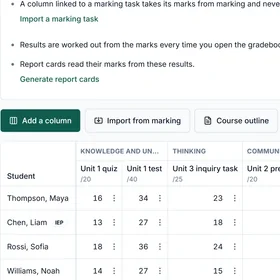
- The gradebookOne per class, filled in from the marked work.

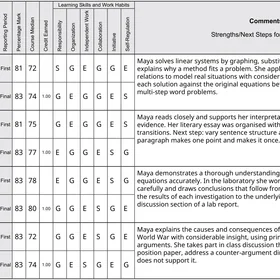
- Report card draftsOn your own form, ready for a teacher to sign.

- Course outlinesUpload one and Margin proposes a gradebook.

- Class linksStudents send in their pages through a link.

- Marked PDFsOne for every student, ready to hand back.

- Class summary and CSVBoth in the same download as the marked PDFs.

- Department seatsInvite graders by email to review the marks.

- Sourced answersEach one lists the course pages it came from.
- Inside MoodleMarlo works in Moodle today, and no other LMS.
- Hand-off to staffQuestions Marlo cannot answer go to a person.
- Questions by voiceStudents can ask out loud instead of typing.
- Conversations keptStudents can reopen any past conversation.
- Admin oversightAdministrators can read every conversation.
- Missing-work rosterTeachers see who has not handed in, by course.
- Early flagsAsk which students have stopped submitting.
- Teacher sign-offEvery mark is a draft until a teacher signs it.
- Your own addressWith your logo and colours, not ours.
- Each school separateNo school can see another school’s work.
- Transcript reviewIncoming transcripts read into a report for staff.
6.3hours
Staff time per student, per semester, on marking, report cards and administration.
504hours a year
At a forty-student school. Report cards are the largest single block, twice per course per student.
1,260hours a year
At a hundred students. More than half of a full-time position spent on work that is not teaching.
Modeled from staff time at schools running Ontario courses. Your own number comes out of the first demo, using your enrolment.
Educators and technologists, building for education as a whole.
We are building the operating system for education providers: one platform for the teacher, the student and the office, where a person signs everything that counts.
- Built for learning.Marlo explains the course from the school’s own material and leaves the work to the student.
- Amplifies educator impact.Margin drafts the marks and the feedback for the whole set. The teacher’s time goes to the judgment calls.
- Unlocks student potential.Every question comes back with the reason for its mark, written beside the line it is about, so a student knows what to work on.
- Strengthens student outcomes.When staff ask, Marlo names the students who have stopped submitting and the work that is missing, and a person can step in.
One platform. Three workspaces.
A teacher’s workspace, a student’s and the office’s, built on one platform so that marks, answers and records come from the same work.
 Teachers
Margin, the Teacher Assistant
Marks the class set against your rubric, drafts the feedback, keeps the gradebook and drafts the report cards. You sign.
How Margin works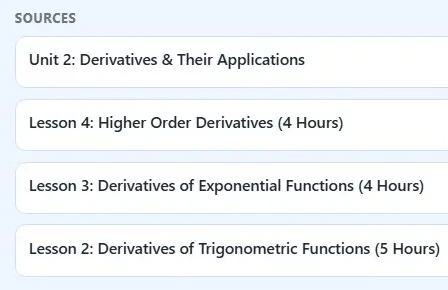
 Students
Marlo, the Tutor
Answers inside the LMS from the school’s own material, with the pages it came from. It explains; it does not do the work. Students send their pages to Margin through a class link.
For students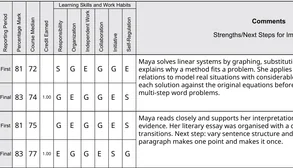
 The office
ElevateSIS, the student information system
The school’s record: the gradebook, report cards and transcripts. The gradebook and report cards work today inside Margin, and attendance is part of the plan.
What ElevateSIS holdsTests, essays, labs and document studies. Marked on the student’s own page.
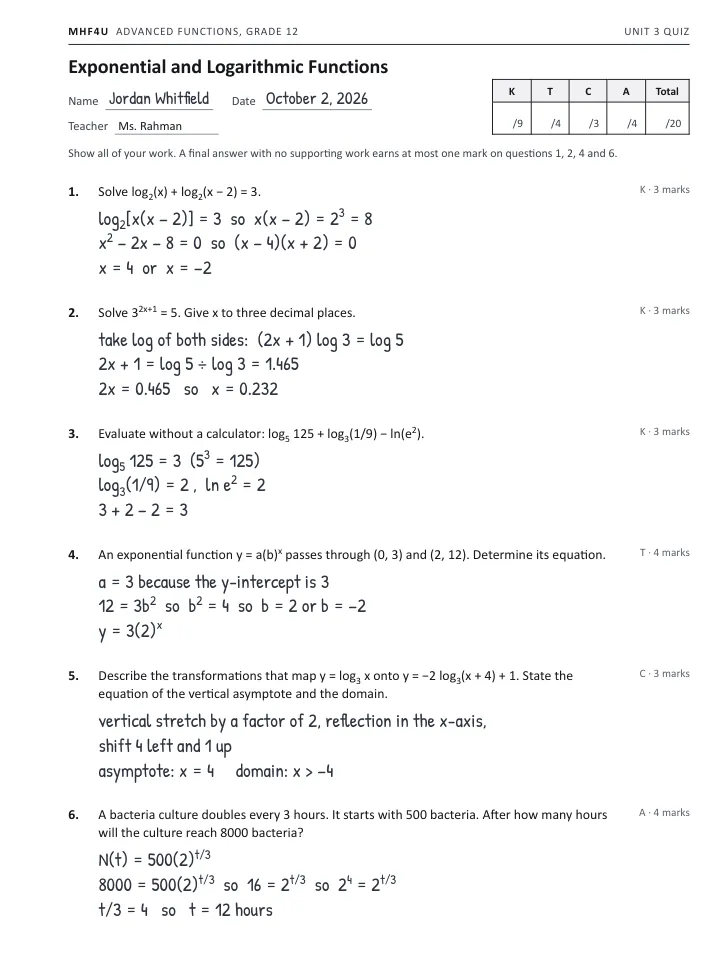
Pick a course, then switch between the page the student handed in and the same page after Margin: a mark on every question, the reasoning tied to the line it came from, and the written feedback, waiting for a teacher’s signature.
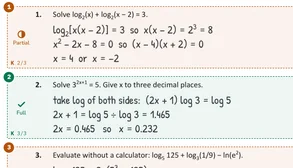
Q1 · 2/3Partial
K 2/3
The quadratic x = 4 or x = -2 is correct, but the rejection of x = -2 is missing: since log2(x) requires x > 0, x = -2 makes the original logarithm undefined and must be rejected with that reason. The final answer should be stated as x = 4, not left as two options.
Q2 · 3/3Full
K 3/3
Clean, correct work throughout: log taken of both sides, isolated properly, and x = 0.232 matches the expected value.
Q3 · 2/3Partial
K 2/3
Sign error: log3(1/9) = -2, not 2, since 1/9 = 3^-2. The other two terms (log5 125 = 3, ln e^2 = 2) are correct, but the sign slip makes the final answer 3 instead of the correct -1.
Q4 · 3/4Partial
T 3/4
The rejection of b = -2 is missing: since the base of an exponential function must be positive, b = -2 should be explicitly ruled out before concluding b = 2. Everything else is correct: a = 3, 12 = 3b^2, and the final equation y = 3(2)^x.
Q5 · 2/3Partial
C 2/3
The asymptote should be x = -4, not x = 4, since the graph shifts 4 units left (the domain line x > -4 correctly reflects this, so the asymptote statement is just inconsistent with your own domain). Transformations (stretch, reflection, shift 4 left and 1 up) are all correctly identified.
Q6 · 4/4Full
A 4/4
Fully correct: the model N(t) = 500(2)^(t/3) is set up properly, 8000 = 500(2)^(t/3) is simplified to 2^4 = 2^(t/3), and t = 12 hours is reached with units included.
As handed in. Switch to Marked by Margin to see the marks.
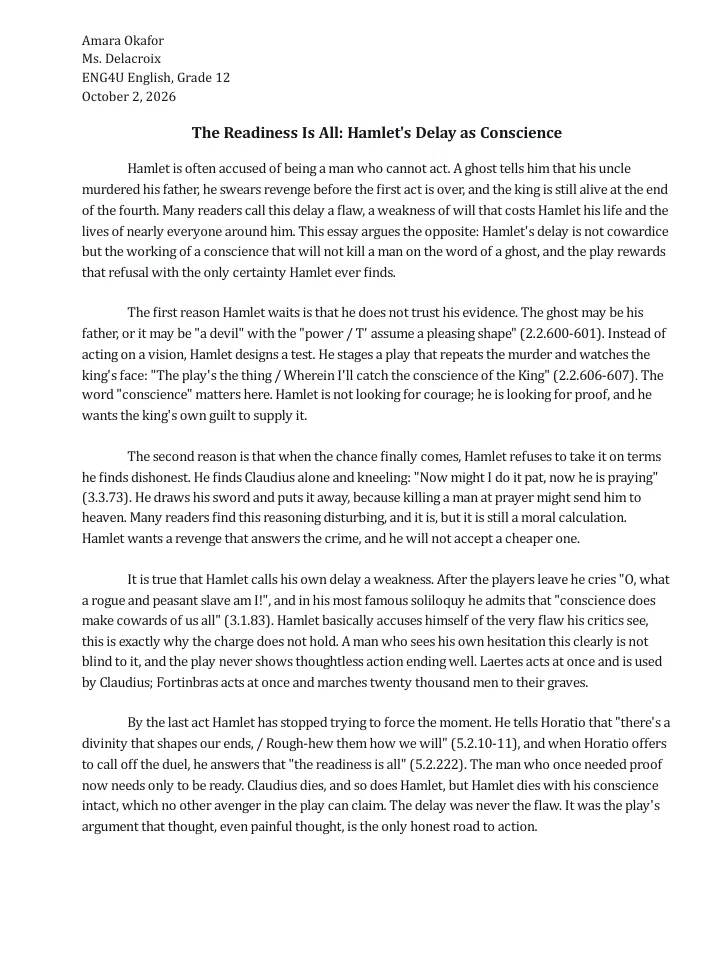
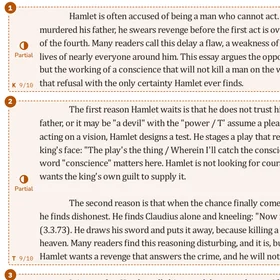
Q1 · 9/10Partial
K 9/10
The thesis in paragraph one is clear and arguable, and it stays consistent through the whole essay rather than drifting. Knowledge of the play is accurate and detailed: the ghost's ambiguity, the Mousetrap scene, the prayer scene, and the final act are all placed correctly and used to build the argument. The one place detail could be sharper is the counter-evidence paragraph ("O, what a rogue and peasant slave am I!"), where the plot context (this follows the First Player's speech) is assumed rather than stated.
Q2 · 9/10Partial
T 9/10
Every quotation is interpreted rather than just dropped in: the "devil"/"pleasing shape" lines are read as evidence Hamlet distrusts, the Mousetrap line is read for the word "conscience," and the prayer-scene quotation is unpacked as "a moral calculation." The counter-argument (that Hamlet himself calls his delay cowardice) is raised directly and answered with the Laertes/Fortinbras contrast, which is a genuinely strong move. The sentence introducing that answer ("Hamlet basically accuses himself of the very flaw his critics see, this is exactly why the charge does not hold") is a comma splice that momentarily blurs the logical turn, so the reasoning is slightly harder to follow right at its sharpest point.
Q3 · 9/10Partial
C 9/10
Organization is clean: each body paragraph has a topic sentence, transitions move the argument forward, and all five quotations are cited correctly in the act.scene.line format the assignment asks for. Voice stays academic throughout. One lapse: "Hamlet basically accuses himself of the very flaw his critics see, this is exactly why the charge does not hold" is a comma splice joining two independent clauses that should be separated by a period or semicolon.
Q4 · 9/10Partial
A 9/10
Well beyond the three-quotation minimum, with five quotations each folded into a sentence that interprets it rather than just stated. The conclusion does more than restate the introduction: it names the wider theme (thought versus action) and extends the thesis into a claim about the play's overall argument, reinforced by the Claudius/Hamlet death comparison. The Laertes and Fortinbras references in paragraph four are summarized rather than quoted directly, so the application of textual evidence there is slightly thinner than in the quotation-driven paragraphs.
As handed in. Switch to Marked by Margin to see the marks.
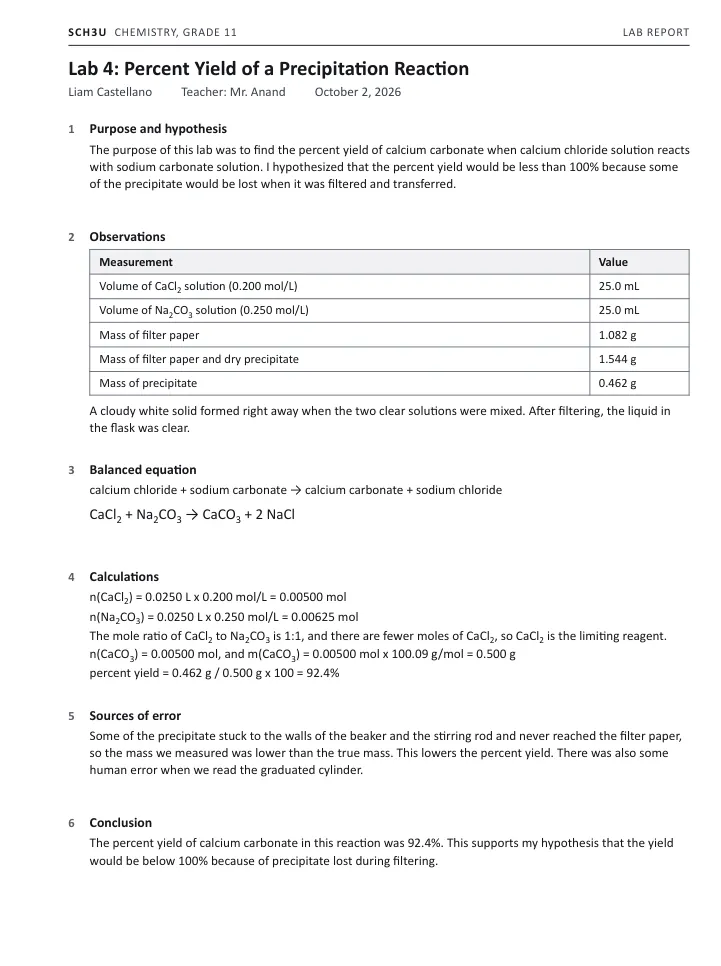
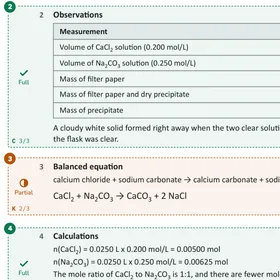
Q1 · 2/2Full
T 2/2
Both the purpose and a testable hypothesis with a reason are clearly stated.
Q2 · 3/3Full
C 3/3
Table includes headings, units, both solution volumes/concentrations, and all three mass measurements with the precipitate mass correctly obtained by subtraction. The qualitative observation of the immediate white precipitate is included as well.
Q3 · 2/3Partial
K 2/3
States of matter are missing: the equation should read CaCl2(aq) + Na2CO3(aq) → CaCO3(s) + 2 NaCl(aq). Formulas and balancing are both correct.
Q4 · 7/7Full
A 7/7
All steps are complete and correct: both mole calculations, correct identification of CaCl2 as limiting via the 1:1 ratio, theoretical mass of 0.500 g, and the percent yield expression evaluated to 92.4%, matching the student's own measured mass of 0.462 g.
Q5 · 1/3PartialCheck
T 1/3
Only one specific source with a stated direction is given (precipitate adhering to the beaker/stirring rod, which lowers the yield). The second point, 'human error when we read the graduated cylinder,' does not state a direction (over- or under-estimate) and reads as a generic human error, which does not earn credit on its own. A second specific source, such as fine precipitate passing through the filter paper or incomplete drying leaving residual water mass, with its direction, would earn further marks.
Q6 · 2/2Full
C 2/2
The conclusion restates the purpose with the numerical result and ties it back to the hypothesis.
As handed in. Switch to Marked by Margin to see the marks.
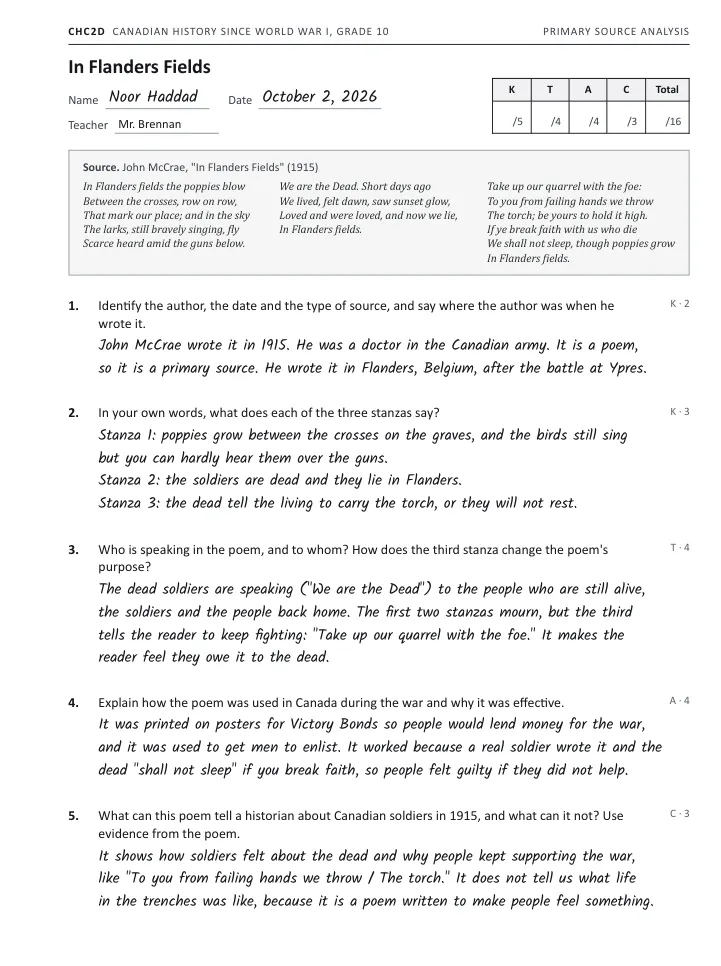
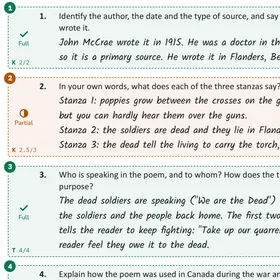
Q1 · 2/2Full
K 2/2
Author, date, type and place are all correctly identified, including the detail that McCrae served as an army doctor near Ypres.
Q2 · 2.5/3Partial
K 2.5/3
Stanza 2's summary is incomplete: it only states that the soldiers are dead, missing the stanza's core contrast that just days ago they were alive, saw dawn and sunset, and loved. Stanzas 1 and 3 are both captured accurately.
Q3 · 4/4Full
T 4/4
Both the speaker/audience identification and the explanation of the purpose shift are clear and supported with direct quotations from the poem.
Q4 · 4/4Full
A 4/4
Both uses (Victory Bonds posters and recruiting) and the explanation of effectiveness, the soldier's authentic voice and the guilt created by the poem's demand, are well covered with supporting evidence.
Q5 · 3/3Full
C 3/3
The paragraph is clear and organized, quotes evidence directly from the poem, and names a real limit of the source (it doesn't describe daily trench life and was written to persuade rather than record).
As handed in. Switch to Marked by Margin to see the marks.
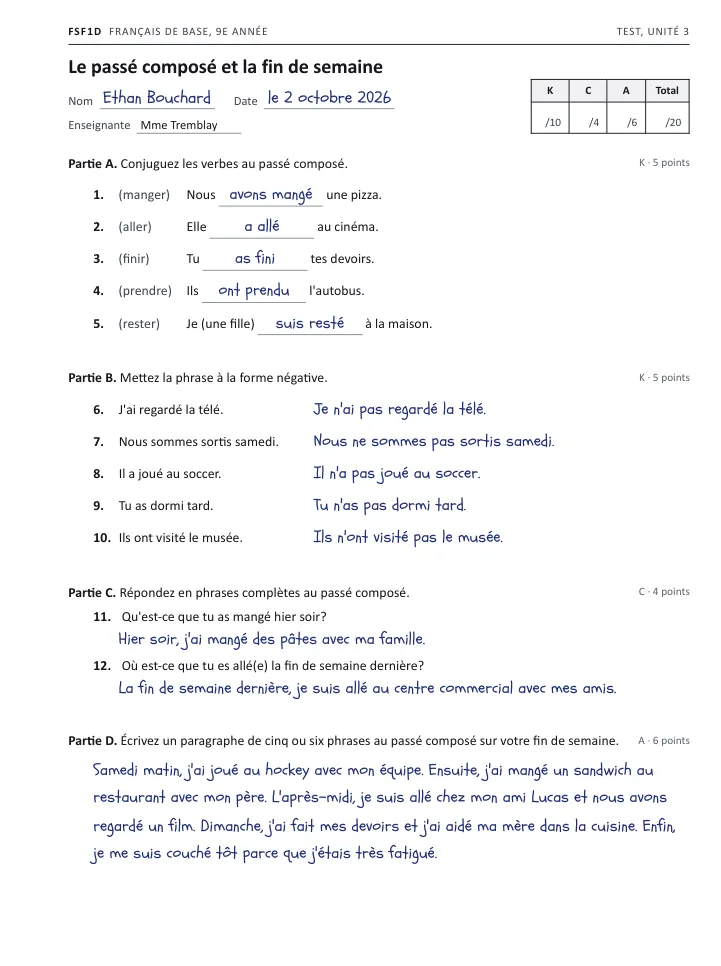
Part A · 3/5Partial
K 3/5
Item 2: 'a allé' uses the wrong auxiliary; aller takes être, so it should be 'est allée'. Item 4: auxiliary 'ont' is correct but the participle should be 'pris', not 'prendu'. Item 5: auxiliary 'suis' is correct, but with 'une fille' the participle needs the feminine agreement 'restée'. Items 1 and 3 are correct.
Part B · 4/5Partial
K 4/5
Item 10: 'pas' must surround the auxiliary ('n'ont pas visité'), not come after the participle; 'n'ont visité pas' is incorrect placement. Items 6-9 all correctly place ne...pas around the auxiliary.
Part C · 4/4Full
C 4/4
Both responses use correct passé composé and form complete, clear sentences with appropriate detail.
Part D · 6/6Full
A 6/6
Five clear sentences with seven correctly conjugated passé composé verbs (auxiliary and participle agree throughout, including the reflexive 'je me suis couché'). Vocabulary covers activities, places and times of day, and transitions like 'Ensuite', 'L'après-midi' and 'Enfin' organize the paragraph clearly.
As handed in. Switch to Marked by Margin to see the marks.
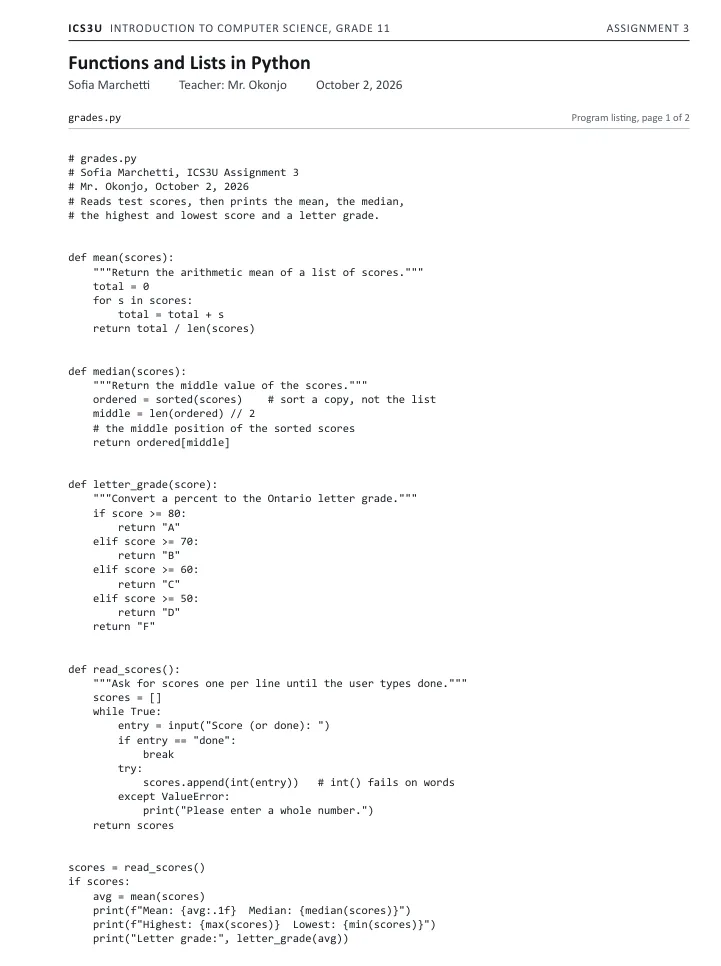
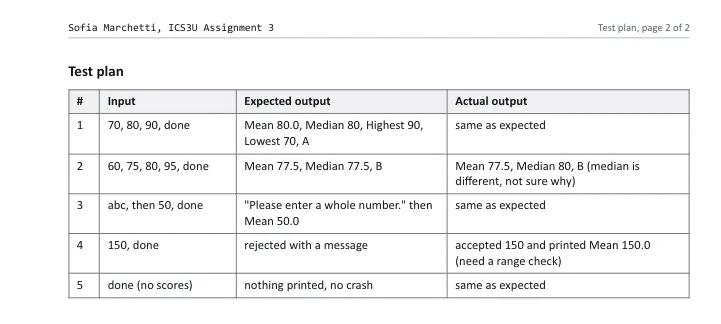
Q1 · 3/3FullPage 1
C 3/3
Header comment includes filename, name, and a description of the program's purpose. Function and variable names are descriptive, every function has a docstring, and the comments on 'sort a copy, not the list' and 'int() fails on words' explain the non-obvious logic. Indentation is consistent throughout.
Q2 · 3/3FullPage 1
K 3/3
Correct sum via the loop, correct division by len(scores), and the value is returned rather than printed.
Q3 · 2/4PartialPage 1
T 2/4
The even-count case is missing: ordered[middle] only returns the upper of the two middle values rather than their average. For [60, 75, 80, 95] this gives 80 instead of 77.5, which the student's own test plan #2 catches and flags as unexplained. Sorting a copy with sorted() and the odd-case logic are both correct.
Q4 · 3/3FullPage 1
K 3/3
Boundaries are correct and in order (80, 70, 60, 50), and every branch returns a string.
Q5 · 2/3PartialPage 1
A 2/3
No range check for 0-100: as the student's own test plan #4 shows, entering 150 is accepted and included in the mean instead of being rejected. The non-number handling (try/except ValueError) and the re-prompt loop that keeps asking instead of crashing are both correct.
Q6 · 4/4FullPage 2
A 4/4
Five complete cases are given, exceeding the four required, and they cover multiple edge cases (even count, non-number, out-of-range, empty list). Case 2 honestly records the actual median output (80) differing from the expected (77.5), which still earns credit since the discrepancy is documented rather than hidden.
As handed in. Switch to Marked by Margin to see the marks.
Each page was marked by Margin against the assessment’s own answer key or marking scheme.
Whatever you set goes in as it is.
Nothing has to be rewritten to fit. Keep your rubric, and hand the work over the way it already arrives. Each kind of work goes in its own way. From the marking on, it is one product, and nothing goes back until a teacher signs.
Hand over the set
A student asks
The exam, its answer key or marking scheme, and the class set, scanned or photographed, in one upload.
The test, its answer key or scheme and the class set in one upload. Or a class link your students send their own pages through.
Each student photographs their pages on a phone and sends them through the class link. Several photos become one submission, in page order.
Essays, lab reports and document studies, typed or handwritten, with the rubric you already use.
The listing and the test plan the student handed in, with the criteria you set.
Inside Moodle, about the course material, a rule, a deadline or a requirement.
Margin marks it
Marlo answers
Every submission, question by question, against your rubric. The reasoning is tied to the line it came from and the written feedback is drafted. A flag marks what to check first.
Every submission, against each criterion you set. Each defect is named with the function it sits in and the written feedback is drafted. A flag marks what to check first.
From the school’s own material, with the pages it came from listed under the answer.
A teacher signs
It goes to a person
Your teacher reads, changes what they disagree with, and signs. The change sticks. The approver is named and the time is recorded.
When Marlo cannot answer, it hands the question to a person.
It goes back, and you see the class
Administrators can read it all
Annotated PDFs, a class summary PDF and a ZIP of the set to hand back or file, every page carrying the footer that a teacher reviewed and signed it. The summary shows the mean, the median, the distribution and the count that needs a second look.
Read access across every conversation, for inspection. Marlo works with Moodle today, and no other LMS.
A whole class marked against your rubric. Overnight.
- Per-question marks with the reasoning tied to the line in the student’s work it came from.
- Knowledge, Thinking, Communication and Application when the course is marked that way, against your own rubric.
- A review queue that puts the judgment calls first. Every mark is a draft until a teacher signs it.
The whole set, ready to hand back in a click. Signed.
- One click downloads the set: a marked PDF for every student, the class summary and a CSV, ready to hand back or file.
- Every page carries the footer: an AI-assisted draft, reviewed and signed by a teacher. Who reviewed each paper, and when, stays on the record.
- Students see nothing of the marking in the app. The set reaches them when the teacher hands it back, and not before.
A tutor inside your LMS that shows where every answer came from.
- Students ask about the course and get an explanation drawn from the school’s own material, with the pages it came from listed underneath.
- Teachers and administrators ask about policy, deadlines and live records, and get the answer with the source attached.
- When Marlo cannot answer, it hands the question to a person. Marlo works with Moodle today, and no other LMS.
The administrative work, drafted for a person to approve.
Behind Marlo, agents work from the same records: the courses, the feedback given during the term, the attendance and the marks. Each one drafts. A named person approves.
Drafted from feedback given during the course.
Confirms the student and course, drafts the comment, fills attendance and midterm or final marks, and produces the Ontario report card as a Word document for the teacher to download, review and sign.
Incoming transcripts read for review.
Reads an incoming transcript supplied as text and drafts an assessment report, as a PDF and a Word file, for staff to review and approve. The credit decision stays with the principal of record.
Students falling behind, surfaced early.
When staff ask, surfaces missing and overdue work and the students who have stopped submitting, so someone can reach them.
Made for everyone who teaches.
Teachers, tutors and the office behind them, on one platform where a person signs everything that counts.












What changes at the school.
Not a promise of hours saved. The four things that are different on the first Monday.
Class sets come back by morning.
Every paper marked against the same rubric overnight, with the reasoning on the page. The teacher’s time goes to the judgment calls, not the first pass.
One standard across markers.
A department marks to one rubric, with the same reasoning written out for every student, whoever is on shift that week.
Every mark signed by a person.
Nothing reaches a student or a parent unsigned. The approver and the time stay on the record, and the change sticks.
Answered, with the source attached.
Students get an explanation from the school’s own material inside the LMS, and the questions Marlo cannot answer go to a person.
Three moments from the product.
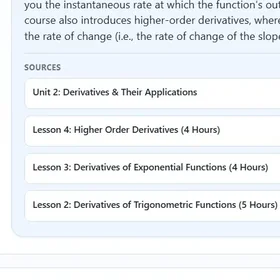
A summary Margin wrote for a student, an answer from Marlo with its sources, and a mark the teacher changed.
It's worth building the habit of asking "does this solution make sense in the original equation or definition?" before finalizing an answer, since that single check would have recovered marks on three different questions here.
Asked what a derivative is, Marlo answers from the course and names its four sources: Unit 2, Derivatives & Their Applications, and three of its lessons.
The teacher changes question 3 from 3 to 2 and saves it, the class summary counts the edit, and the paper is marked reviewed.
Three steps, and the third one is always a person.
Two steps draft. The third signs.
-
01
Give it your material
The assessment, the answer key or rubric, and the class set. Or a class link your students send their own pages through.
-
02
We draft
Marks per question with the reasoning tied to the line it came from, the written feedback, and a flag on what to check first.
-
03
A person signs
Your teacher reads, changes what they disagree with, and signs. The change sticks. The approver is named and the time is recorded.


From sign up to a working school.
Your school exists at its own address the moment you sign up, with no card. Mark the free papers first. When they are used, choose a plan and enter a card, and everything after that runs on its own.
- You
Pick a plan, or press Try it free
Choose Starter, Pro or School on the pricing page, or press Try it free anywhere on the site. The plan you pick travels with you to the signup page.
- You
Create the account
The signup page asks for your name, your email and a password, and sends a confirmation link. Open it to finish. No card is asked for.
- You
Name your school
Choose a workspace for one teacher or for a whole organization, name it, pick its web address such as yourschool.elevategrade.com, and agree to the terms.
- Elevate Grade
The workspace opens
The app sets up the workspace at its own address and sends a welcome email: your free papers are ready. The app’s header shows how many are left.
- You
Mark with the free papers
Create a task, upload the assessment and the papers, confirm the marking scheme and let Margin draft. A teacher reads and signs every mark. The free papers are marked with everything the School size carries, essay marking included.
Your school, at its own address, from the first minute.
Sign up, name the school, and it exists at yourschool.elevategrade.com with your logo and colours. Teachers sign in there and see your name, not ours.
Isolated by design
Every task, submission and marked PDF stays inside your school’s environment. Another school’s work is not visible to you, and yours is not visible to them.
Seats for the department
Invite graders by email. They create tasks, upload work and review marks. Billing and branding stay with the owner of the account.
Billed per school
Each school has its own plan, its own invoices and its own billing page, so a network of schools is never one shared bill.
Six lines we hold to, so a school can say yes.
They are the reason the product is safe to run where the mark actually counts.
A person signs everything.
No mark, comment, report card or credit decision reaches a student, a parent or a transcript without a named person approving it.
We explain. We do not do the work.
Marlo explains the course material and the rule with the source attached. It does not write, solve or submit the student’s assignment.
We show the work.
Every draft carries its evidence: the rubric line, the source passage, and a flag marking what a teacher should check first.
Built where the mark counts.
Marks per question against the school’s own key or rubric, and per category where the course is marked that way. Not a generic score with a label attached afterwards.
We say what it cannot do.
No accuracy figure without a published benchmark. No claim before it is contractual. Marlo works with Moodle and no other LMS today.
The school’s name is on the work.
What reaches a family looks like it came from the school, because it did. Our mark stays on the surfaces staff work in.
Small teaching staffs carrying full marking loads.
- Private and online schoolsAssessment turnaround gets away from a small staff by late October. Rubric-aligned output with the approving teacher named doubles as inspection evidence.
- Tutoring centresMarking is unbillable time, and what goes home to the family is what keeps a student enrolled. Faster turnaround, the same standard across every tutor, and the written feedback on every page.
- Principals and ownersConsistency across staff, a record of who approved what and when, and hours you can put a number on. Marlo gives administrators read access across every conversation for inspection.
Three plans. One credit marks one submission.
Pick the plan that fits the school and try it free first. Prices in Canadian dollars, billed to each school on its own. Flip to yearly to see the saving.
Starter
For a single teacher or a small tutoring room.
CA$34a month
billed monthly, or CA$324 a year billed CA$324 a year21% less than monthly
- 50 marked submissions a month
- 1 grader seat
- Essay marking is on Pro and School
Pro
For a busy department that also marks essays.
CA$83a month
billed monthly, or CA$828 a year billed CA$828 a year17% less than monthly
- 125 marked submissions a month
- 3 grader seats
- Essay marking against your rubric
School
For a whole school or a centre with several campuses.
CA$349a month
billed monthly, or CA$3,348 a year billed CA$3,348 a year20% less than monthly
- 500 marked submissions a month
- 10 grader seats
- Essay marking against your rubric
Top-up packs from CA$15 for 25 credits when a month runs short. Compare the plans in full.
The ones every principal asks.
If yours is not here, send it to support@elevategrade.com and you get a written answer.
How do I start?
Pick a plan, or press Try it free, and sign up at app.elevategrade.com. Name your school and your workspace opens at its own address. Starting is free: sign up with an email, no card needed, and Margin marks a limited number of papers free. After that, choose a plan to keep marking. Your first papers can go in straight away. If you would rather see it first, book a demo and bring a real assessment.
What does it cost?
Starting costs nothing: a limited number of papers are marked free, with no card. After that, Margin starts at CA$34 a month for 50 credits, and one credit marks one submission. Paying yearly costs less. The plans are compared in full on the pricing page.
Does it replace teachers?
No. It does the first pass of the work around teaching and hands it to a teacher. The teacher reads every mark, changes anything they disagree with, and signs. That is the whole design, not a setting.
Does it decide grades?
It drafts them. A person decides. It does not grant credits, issue official marks, or replace anyone’s judgment. Credit decisions, transcripts and custody of the student record stay with the school and its principal of record.
How accurate is it?
There is no published benchmark yet, so no number appears on this site. Send a class set you have already marked and compare the two, line by line, on your own material.
Which courses does it mark?
Every subject on this page was marked by Margin: mathematics, English, science, Canadian history, French, computer science. Mathematics and science assessments, and essays marked against a rubric, are where it is used most. Ask about your course on the demo, with a real assessment in hand.
Can students use Marlo to do their work?
No. Marlo is a tutor. It explains the course material, the rule, the deadline and the requirement, with the source attached. It does not write, solve or submit the assignment for the student.
Who approves the report cards?
The teacher. The report card is drafted from the marks and the feedback given during the course, and the teacher reviews, edits and signs it before it goes anywhere. The principal of record stays responsible for the credit.
Mark your first papers this week.
Starting is free: sign up with an email, no card needed, and Margin marks a limited number of papers free. After that, choose a plan to keep marking. Your school gets its own address from the first minute. Or book thirty minutes on a real course, including the moment a teacher changes a mark.